Space Explorer Rope Jump succeeds by focusing on one core mechanic and polishing it well. The rope swing requires real timing and planning, making each successful landing feel rewarding. The gradual difficulty curve keeps the game accessible for newcomers while still offering a challenge for experienced players. The browser-based design means it works instantly on any device, which is a major convenience. A solid choice for anyone who enjoys thoughtful platforming.
At the heart of this game lies a simple but satisfying movement system. Players control a character that uses a rope to swing from one platform to the next. The rope length and swing arc must be judged correctly to land safely. Holding the action button longer extends the jump distance, which helps when crossing wider spaces. This core mechanic creates a rhythm where each swing feels like a small puzzle to solve.
The stages start with straightforward layouts that teach the basics of rope swinging and landing. As players advance, platforms become more spread out and the timing windows grow tighter. Later levels introduce sequences where multiple swings are needed in a row without a safe pause. This gradual increase in difficulty keeps the experience engaging without becoming frustrating too quickly.
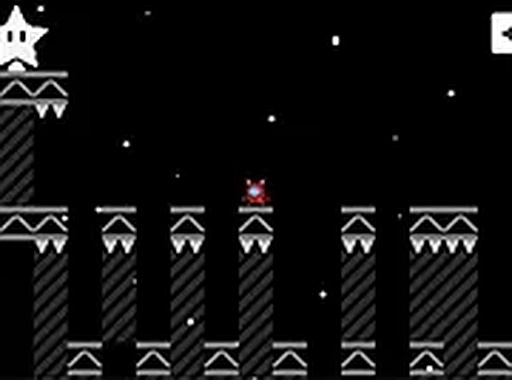
The game uses a clean, colorful art style that is easy to read even on small screens. The space theme is carried through with starry backgrounds and simple platform shapes that stand out clearly. This visual clarity helps players focus on the precise movements required without distraction. The overall look is friendly and inviting, suitable for players of all ages.
One of the strong points of this game is how easily it adapts to different devices. On a desktop computer, players use the keyboard to control the character. On a mobile phone or tablet, touch controls take over with on-screen buttons. The game runs directly in a web browser, so there is nothing to install or download. A full screen mode is available for those who want a more focused view.
Success in this game depends on more than just quick reflexes. Each level can be studied before making a move. Looking ahead to see where the next platform is located helps players decide how much swing force to use. Some stages have platforms that are not directly in line with each other, requiring a curved swing path. Taking a moment to plan the route often makes the difference between a clean run and a fall.
Like many precision-based games, regular practice leads to noticeable improvement. The controls are responsive, so mistakes usually come from poor timing rather than unresponsive input. Repeating a difficult section builds muscle memory for the exact swing lengths and jump durations needed. The game rewards patience and steady hands, making each successful landing feel earned.





Player Comments
Sign in to comment
You must be logged in before posting a review or rating.
No account? Create one
No comments yet. Be the first to comment!